📱Tech Tip: My First Steps with iMovie (Just Photos)

I’ve dipped into iMovie a few times over the years, opened it, felt completely lost… and closed it again.
This week, I decided it was time to stop avoiding it and start from the very beginning. Nothing clever. Just opening iMovie, adding a few photos, and seeing what happens.
The reason I wanted to learn iMovie is simple. It gives me an easy way to turn everyday photos into short videos I can share — on my website, with family, or on social media — without needing extra apps or subscriptions.
If you’ve never used iMovie — or it’s left you frustrated before — this is a good place to start.
Here’s the simple photo movie I made while learning this first step — just photos, nothing edited yet.
Step 1: Open iMovie
- Find iMovie on your iPad or iPhone
- Tap through any welcome screens until you reach Projects
This is where all your movies live.
Step 2: Create a new movie
- Tap Create Project
- Choose Movie (not Trailer)
Your Photos library will open.
Step 3: Choose a few photos
This part confused me at first, so here’s the key thing to know:
- Tap a photo once and it gets a blue tick
- You can select as many photos as you like
- Don’t worry about the order yet
For your first go, 5–10 photos is plenty.
When you’re ready, tap Create Movie at the bottom.
Step 4: Watch it play
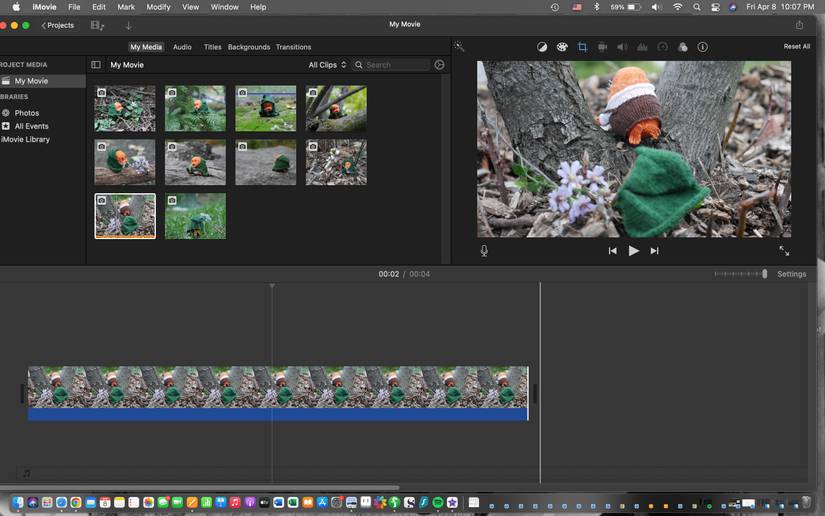
iMovie automatically places your photos on a timeline and creates a short movie.
At this stage, don’t change anything.
Just press ▶️ and watch it through.
Step 5: Save it to Photos
This is the important bit at the end.
- Tap Done (top left)
- Back on the Projects screen, tap the Share icon
- Choose Save to Photos
Leave the quality as it is and let it export.
Your movie will now appear in Photos, just like any video you’ve recorded.
Final thought
You don’t need to understand iMovie to get started.
Opening it, adding a few photos, and saving a movie is enough to get going.
iMovie makes it easy to turn everyday photos into something you can share and enjoy.
What’s next
In the next Tech Tips, we’ll look at the parts that make a movie more interesting — changing the order of photos, adding transitions, and bringing it to life with music.
Everything builds on this first step.
If you can do this, you’re ready to move on.